How to keep one money book with your family
The people at home can write in one book: each writes what they spent, and everyone sees the same totals. For two people it is free.
Step by step
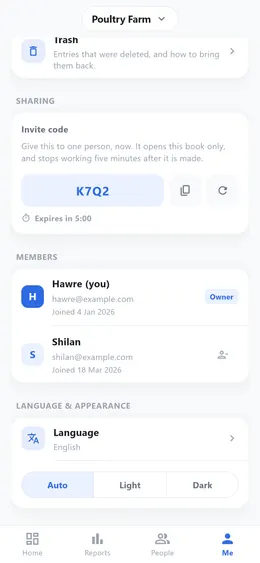
- In «Me», go to «Sharing». Your «Invite code» is there.
- Copy the code and send it to the other person. It works for five minutes and for one person only; if it runs out, make a new one.
- They open the app, tap the book’s name at the top of the screen, and choose «Join with a code».
- They type the code and are in. From then on you both see the same entries.
Good to know
- Each of you can change or delete only the entries you wrote yourself, and every entry shows who wrote it.
- When the other person writes something, your phone shows a notice.
- Both of you need a saved account. If one of you started without one, the app asks to save it first.
- Free for 2 people. A third person and more need Premium.