
One book for the home
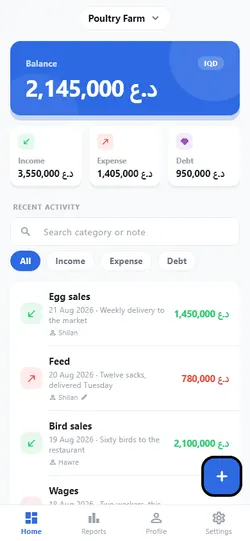
You and your partner write in the same book for free, and every entry says who wrote it.
For families
You and your partner write in the same book and see the same thing. Rent and bills write themselves, and each month shows where the money went.
Free, no account needed. Coming soon to Google Play and the App Store.
For the home
Nobody has to ask at the end of the month where the money went.
You and your partner write in the same book for free, and every entry says who wrote it.
When another member adds or changes an entry, your phone lets you know.
Set the rent, electricity or internet once; it is written each month on its day, and if you like, you hear about it two days before (Premium).
Set a limit for the month’s spending and see how much is left (Premium).
A receipt photo on any entry, for free. Everyone in the book can see it.
When a book’s owner has Premium, everyone in that book has it there too.
Getting started
No account needed. Save it from “Me” whenever you like.
Income, an expense or a debt, in dinars or dollars.
Make a code under “Me” and give it to your partner, your staff or your spouse.
Safety
In an app about money, this comes before anything else.
With the people you share a book with. The people who run the app can see your account, not your books or your entries.
A PIN or fingerprint, and hidden amounts when someone is beside you.
We show no ads, and we sell nothing about you.
Download all your data, or delete your account, without asking anyone.
Plans
When a plan ends, nothing is deleted and nothing is locked.
0 د.ع
To get started
17,750 د.ع Yearly
≈ 1,480 د.ع a month · 15% less than monthly
For you and your family
51,750 د.ع Yearly
≈ 4,310 د.ع a month · 9% less than monthly
For shops and trade
These are the prices of codes on the web. In the App Store and Google Play, the store shows its own price before you confirm.
| Free | Premium | Business | |
|---|---|---|---|
| Recording income, expenses and debts | ✓ | ✓ | ✓ |
| Reports of income and expenses | ✓ | ✓ | ✓ |
| Seeing where the money went, as a chart | ✓ | ✓ | ✓ |
| Creating your own categories | ✓ | ✓ | ✓ |
| Writing entries in dinars and dollars | ✓ | ✓ | ✓ |
| Backing up to your own Google Drive | ✓ | ✓ | ✓ |
| A photo of the receipt on any entry | ✓ | ✓ | ✓ |
| Undoing a deletion | ✓ | ✓ | ✓ |
| Support from the team | ✓ | ✓ | ✓ |
| Searching income, expenses and debts | ✓ | ✓ | ✓ |
| Books of your own | 1 | ∞ | ∞ |
| Number of categories | 40 | ∞ | ∞ |
| People sharing a book | 2 | ∞ | ∞ |
| Exporting a report as PDF, or entries as a file | — | ✓ | ✓ |
| Building a report or a receipt from your own period and categories | — | ✓ | ✓ |
| Automatic backup to Google Drive | — | ✓ | ✓ |
| Setting a debt due date | — | ✓ | ✓ |
| Monthly repeating entries | — | ✓ | ✓ |
| A monthly spending goal | — | ✓ | ✓ |
| Deeper reports | — | ✓ | ✓ |
| Every other currency in the world, from the euro to the yen | — | ✓ | ✓ |
| A statement and a WhatsApp reminder for each person | — | 10 a month | ∞ |
| Debt age: what has been out 30, 60 or 90 days | — | — | ✓ |
| Staff permissions: choose what each member may do | — | — | ✓ |
| Your own name, not ours | — | — | ✓ |
Questions
Yes, and for free. Make a code under Me and give it to them within five minutes — after that it stops working and you make another. You both then see the same entries, and each of you can change or delete only the entries you wrote yourself. A third person and more need Premium.
Yes. When somebody else adds or changes an entry in a book you share, your phone shows a notice — even with the app closed, as long as notifications are allowed for it. While the app is open, a small notice also appears at the top. Your own entries are not announced back to you.
Yes. When a book's owner has Premium, everyone in that book has it there too: a third person, statements, WhatsApp, Excel and PDF. Not in their own books. With Business, their statements and reminders in that book have no monthly limit. When the owner's plan ends, nothing in the book is hidden.
Yes, with Premium. Under Me, open More options, turn on Automatic entries, and add a rule: an amount, a category and a day of the month. It is written into the book on that day, and marked so you know you did not type it. A month too short for the day you picked uses its last day.
Yes, on any entry, and it costs nothing extra. Open an entry, tap Add receipt, and take a photo or pick one. Everyone in the book sees it, which is the point of it: the book already says who wrote a line, and the photo says what it was for. The picture is made smaller before it is sent, so it does not eat your data. Attaching one needs a connection — the entry itself saves without one, and you can add the photo later.
Free, no account needed, in a minute.